Models Live in One Tool, Questions in Another
- 1Questions about a model are sent by email with screenshots, and the reviewer has to find the element again
- 2Clashes between architecture, structure and MEP surface late because the models are not checked against each other
- 3Site and office staff without authoring software cannot open the model to check an element's properties
Arkan BIM Model Coordination Capabilities
IFC Upload by Discipline
Upload .ifc files of up to 100 MB tagged as Architecture, Structure, MEP (Mechanical, Electrical or Plumbing) or Civil. The server converts each upload for the viewer, and its status moves from Uploading and Processing to Ready.
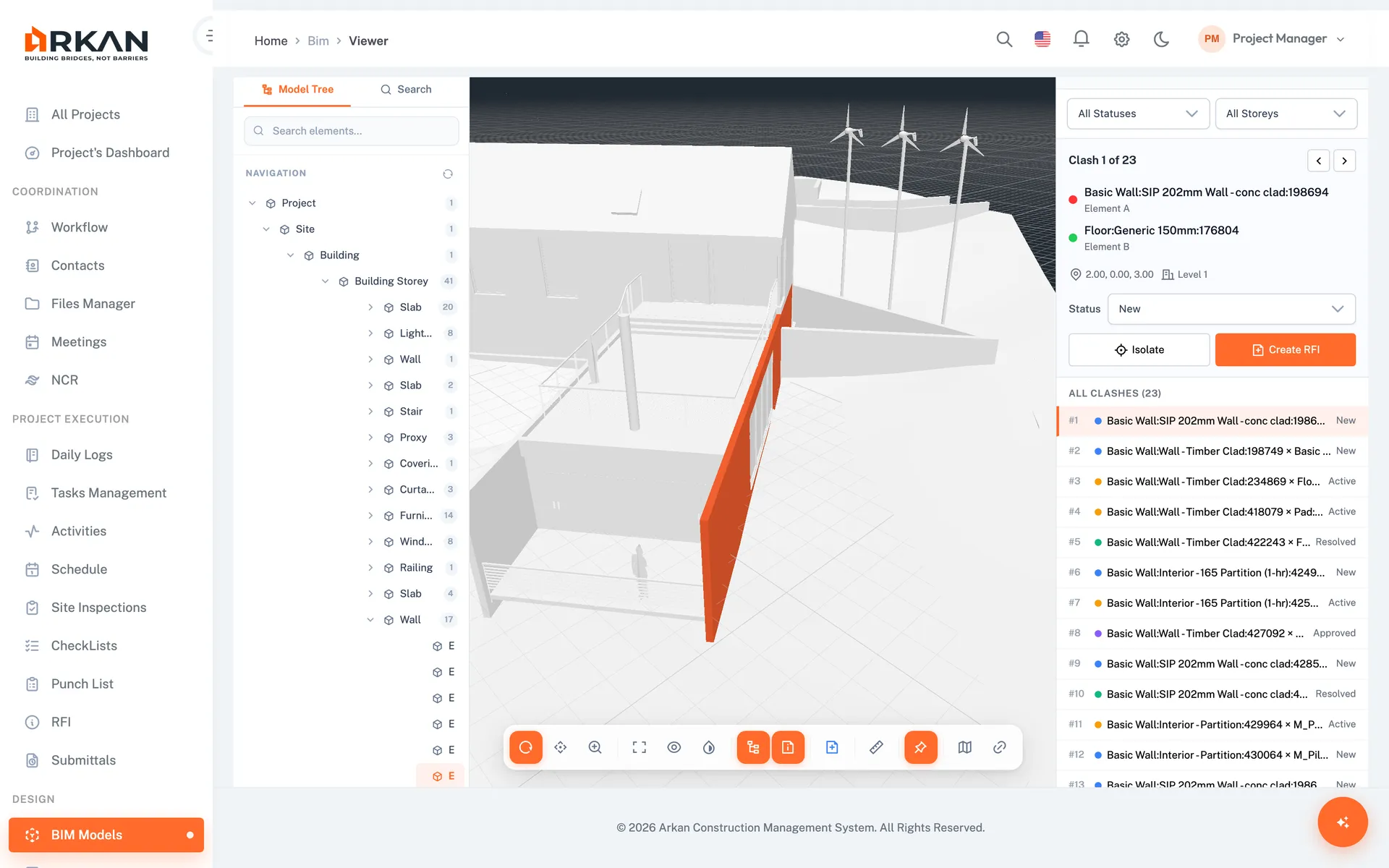
Browser-Based 3D Viewer
Orbit, pan and zoom, double-click to fly to an element, and isolate or hide parts of the model. It runs in a modern browser with WebGL, with nothing to install.
Model Tree & Element Search
Browse the spatial hierarchy from Project and Site to Building and Storey, or search elements by name or GUID and filter by IFC type and storey.
Properties Panel
Select an element to see its GUID, entity type and every IFC property set in collapsible groups. Copy the GUID with one click.
Clash Detection
Run clash tests with a tolerance from 1 to 5,000 mm in the background. Mark each result New, Active, Resolved or Approved, filter by storey, and fly to it in the viewer with both elements highlighted.
RFIs from the Model
Raise an RFI from a selected element or a clash result. The RFI saves the camera viewpoint and a screenshot, shows as a pin in the model, and a View in Model button takes reviewers back to the same spot.
Simple 4-Step Process
Upload: Add an IFC file and choose its discipline
Explore: Open the model and use the tree, search and properties panel
Coordinate: Run clash tests and triage each result by status
Ask: Create an RFI from an element or clash with the viewpoint saved
At a Glance
Disciplines
6
Architecture, Structure, three MEP disciplines and Civil
Clash Statuses
4
New, Active, Resolved and Approved
Upload Limit
100 MB
Per IFC file, processed on the server
Works seamlessly with other Arkan features
BIM Model Coordination integrates with RFI & Submittal Management, Drawings & BIM, Specifications and more for a complete construction management solution.
Related Features
Explore other features that work great with BIM Model Coordination