Take Command of Every Project. From First Pour to Final Handover.
You don't need another tool that creates more work. Arkan connects your schedules, BOQs, inspections, and payments into one system—so you spend less time on paperwork and more time building.
Is Arkan Right for You?
If any of these apply to you, you're in the right place.
How It Works
Three simple steps to get started with Arkan
Discovery
We analyze your current workflows, pain points, and project requirements
Setup & Import
Import your P6 schedules, BOQs, and existing documents
Go Live
Launch with dedicated support and role-based training for your team
The Reality You're Living
Challenges construction teams in the region know well.

Schedule Delays Nobody Sees Coming
Your Primavera P6 schedule lives on the planner's laptop. By the time delays surface in weekly meetings, they've already cascaded through three subcontractors.

Payment Certificates That Take Forever
Your QS spends 3 days every month building IPCs from scratch. BOQ quantities are copy-pasted from Excel. The consultant rejects it, and you start over.
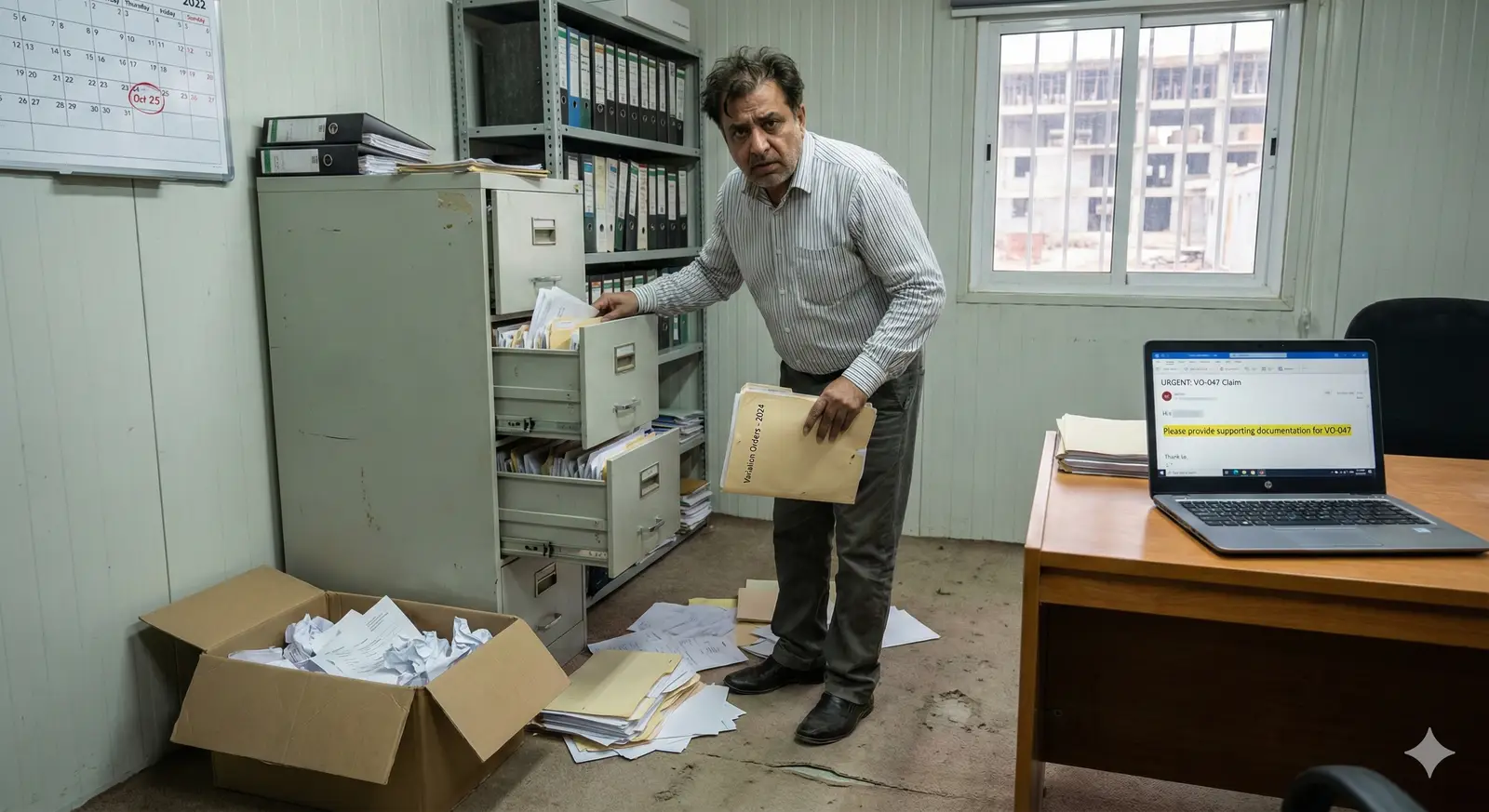
Variations Lost in Email Chains
A site instruction from 6 months ago should have been a VO worth AED 800K. But nobody tracked it properly. Good luck recovering that at final account.
Variations are a black hole.
A change gets approved verbally on site. Six months later, nobody can prove it happened. Your variation claim gets rejected. That's AED 200,000 you'll never recover.
You're managing multiple projects with multiple systems.
Different spreadsheets for different projects. Different folder structures. Different ways of doing things. When leadership asks for a portfolio view, someone has to work the weekend to compile it.
What You Get
How Arkan helps your team day to day.
Faster Payment Requests
Build payment requests from BOQ items in a guided 4-step wizard. Retention, advance-payment recovery and VAT are calculated by the system.
Schedule and Progress in One Place
Import your P6 schedule and see it next to BOQ, inspection and financial progress on the project dashboard.
Documented Variations
Each BOQ variation is recorded with its value impact and routed through an approval workflow with comments.
Issues Pinned to Drawings
Link non-conformance reports to Smart Pins on project drawings so every issue is tied to a location.
A Clear Record
Document version history and workflow history show who submitted, reviewed and approved what, and when.
Built for How You Work
Every feature is designed with your specific needs in mind.
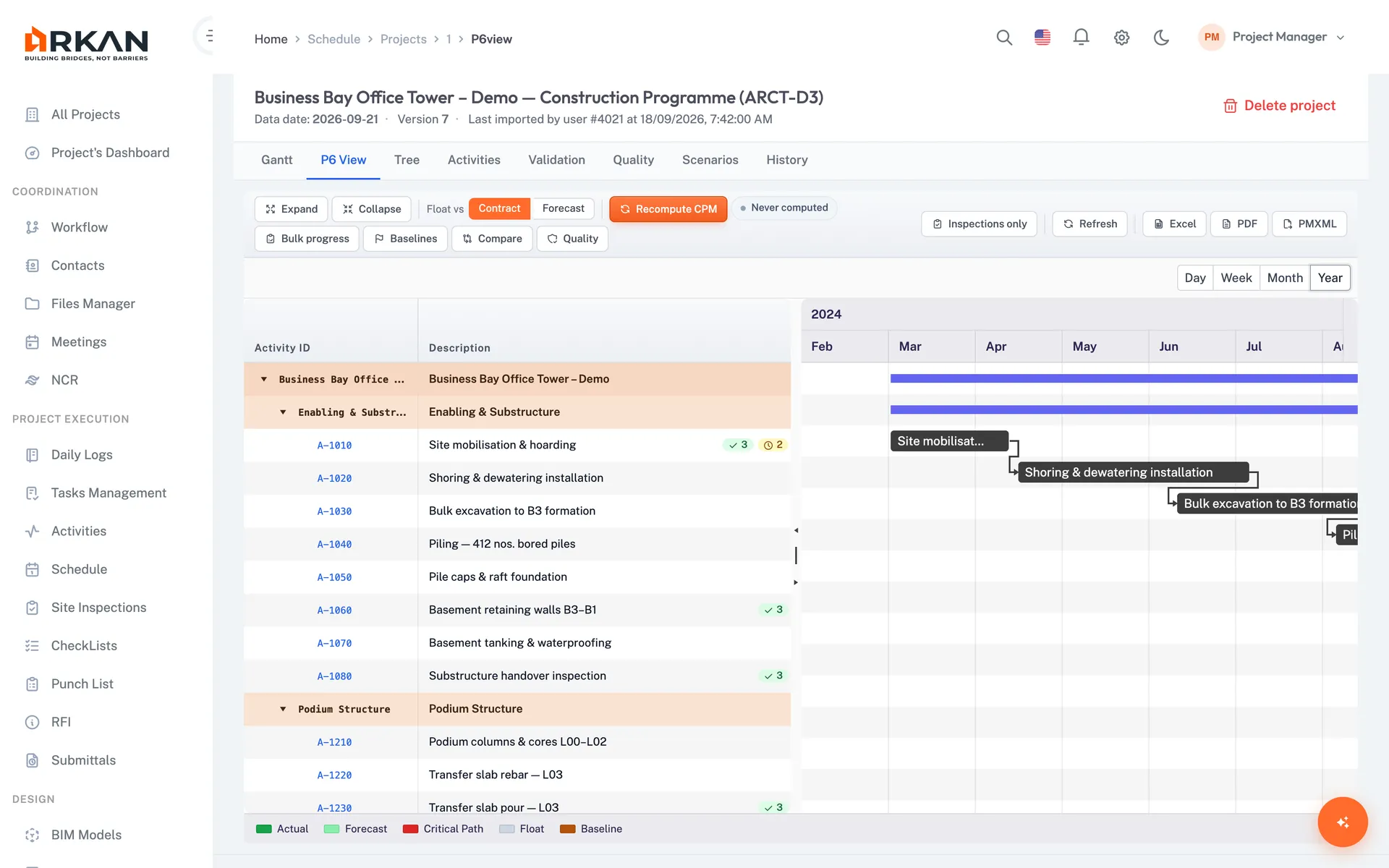
Primavera P6 Schedule Import
Upload your P6 export (.xml or .xer) to view activities in grid and Gantt views, track completion, review critical path analysis and compare schedule versions.
The whole team can see the schedule without a P6 licence.
- Import .xml and .xer files
- Grid and Gantt views
- Critical path analysis and version comparison
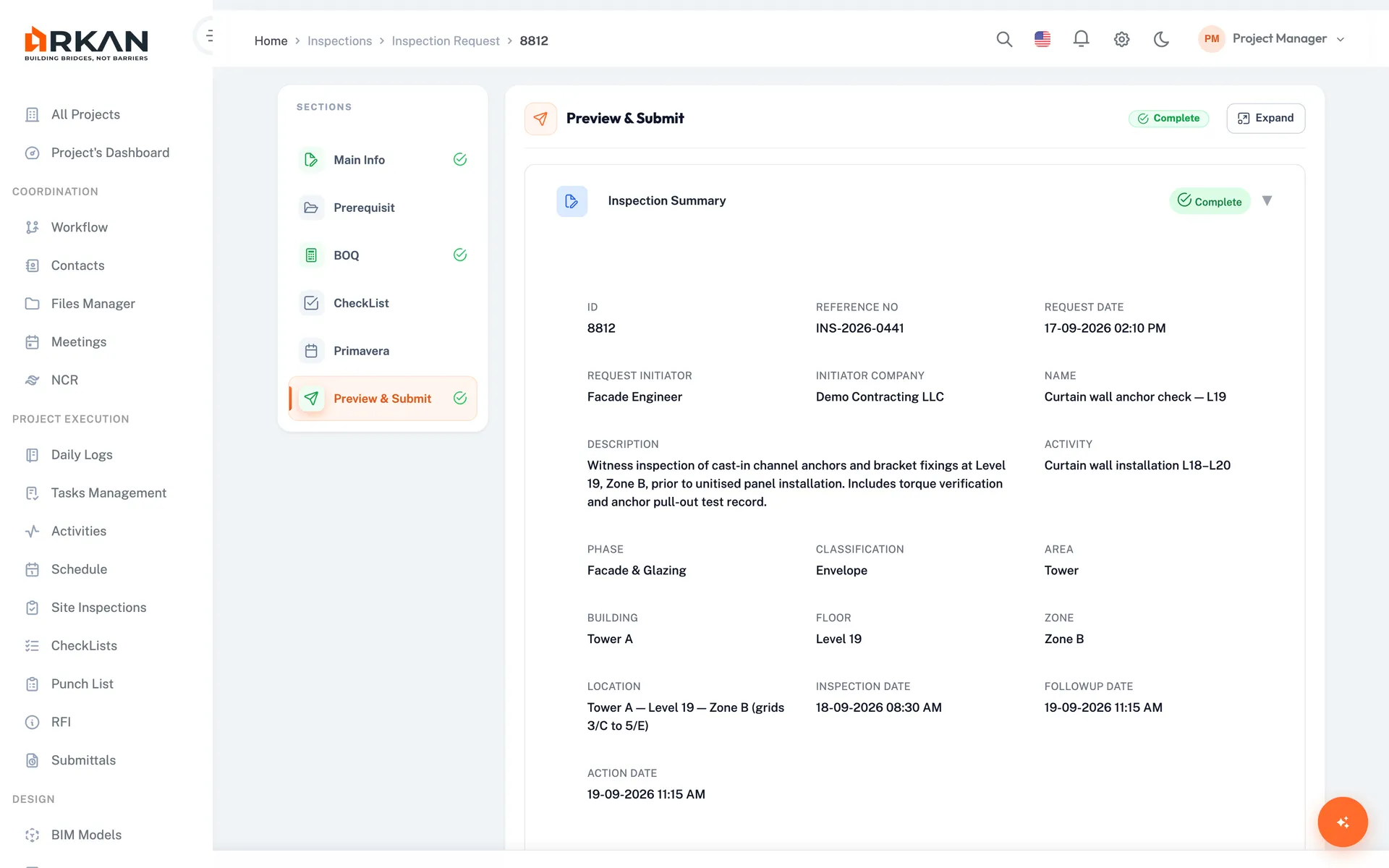
6-Step Inspection Workflow
Inspection requests link to BOQ items, prerequisite documents, quality checklists, and schedule activities.
Every inspection request is tied to the BOQ items, checklist and schedule activity it covers.
- Guided six-step request with preview
- Digital signature and PDF report
- Linked BOQ items and schedule activities
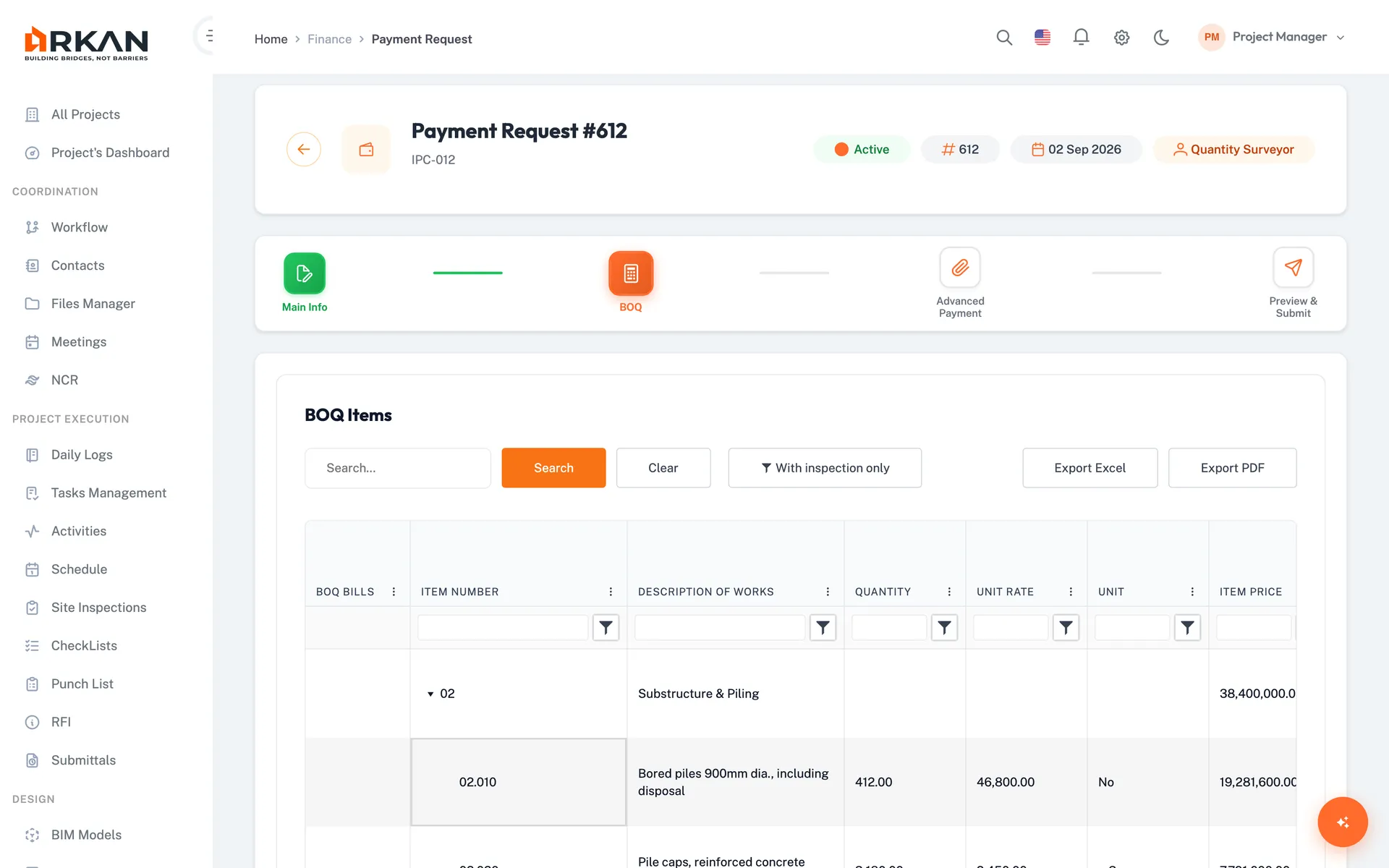
BOQ-to-Payment Workflow
Select certified BOQ items, apply deductions and retention, generate payment certificates.
Calculations are done by the system instead of being rebuilt in spreadsheets every month.
- Guided 4-step payment request wizard
- Retention, advance recovery and VAT
- Transaction history for BOQ changes
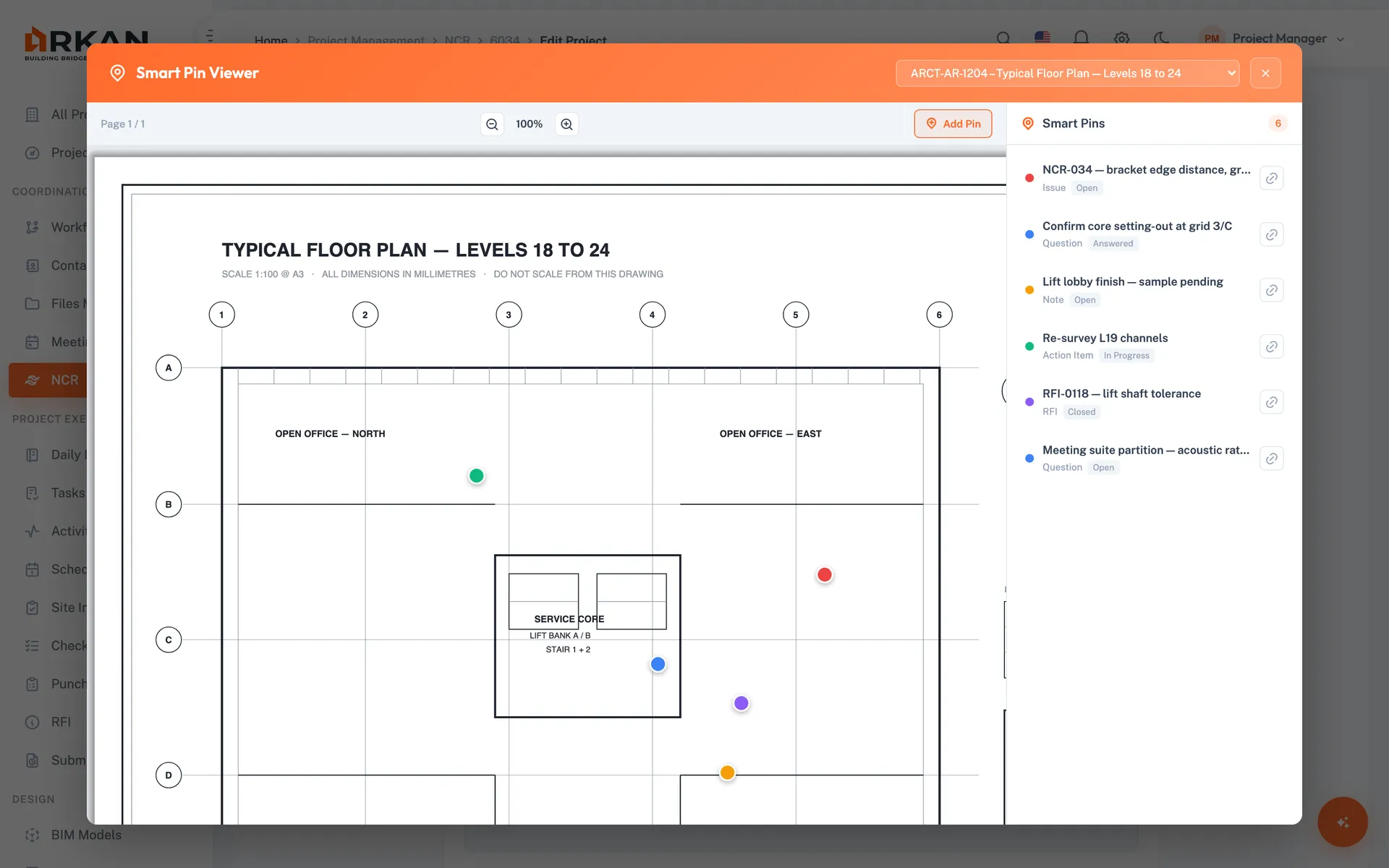
Issues Pinned to Drawings
Place Smart Pins on project drawings and link non-conformance reports to them. Tasks, RFIs and meeting actions can reference the drawings they concern.
Issues stay tied to a location on the drawing, not buried in email threads.
- Smart Pins on drawing PDFs
- NCRs linked to pin locations
- Tasks and RFIs that reference drawings
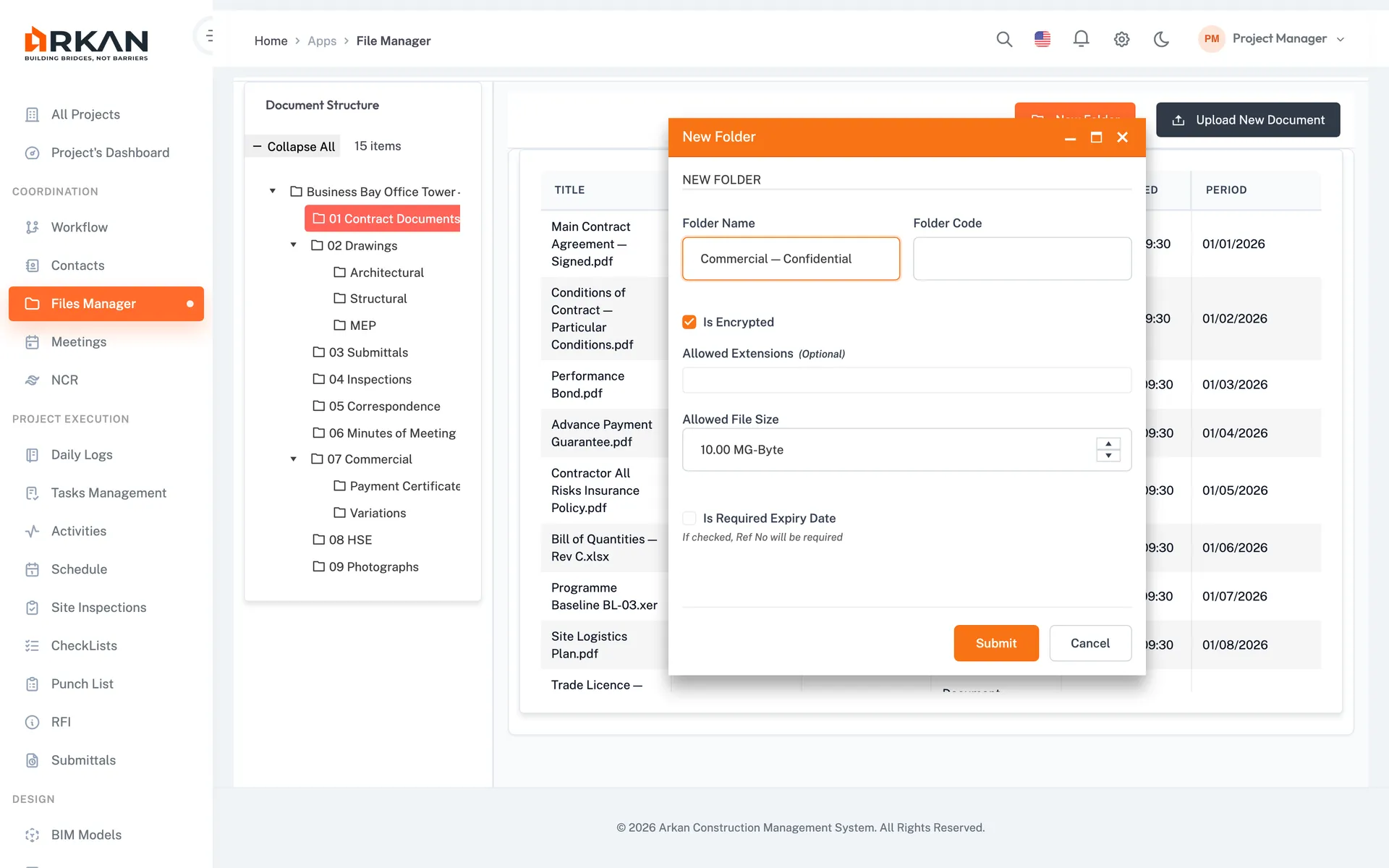
Version & Workflow History
Documents keep a full version history, and each approval step is recorded in the workflow history.
When questions come up later, you can show who approved what, and when.
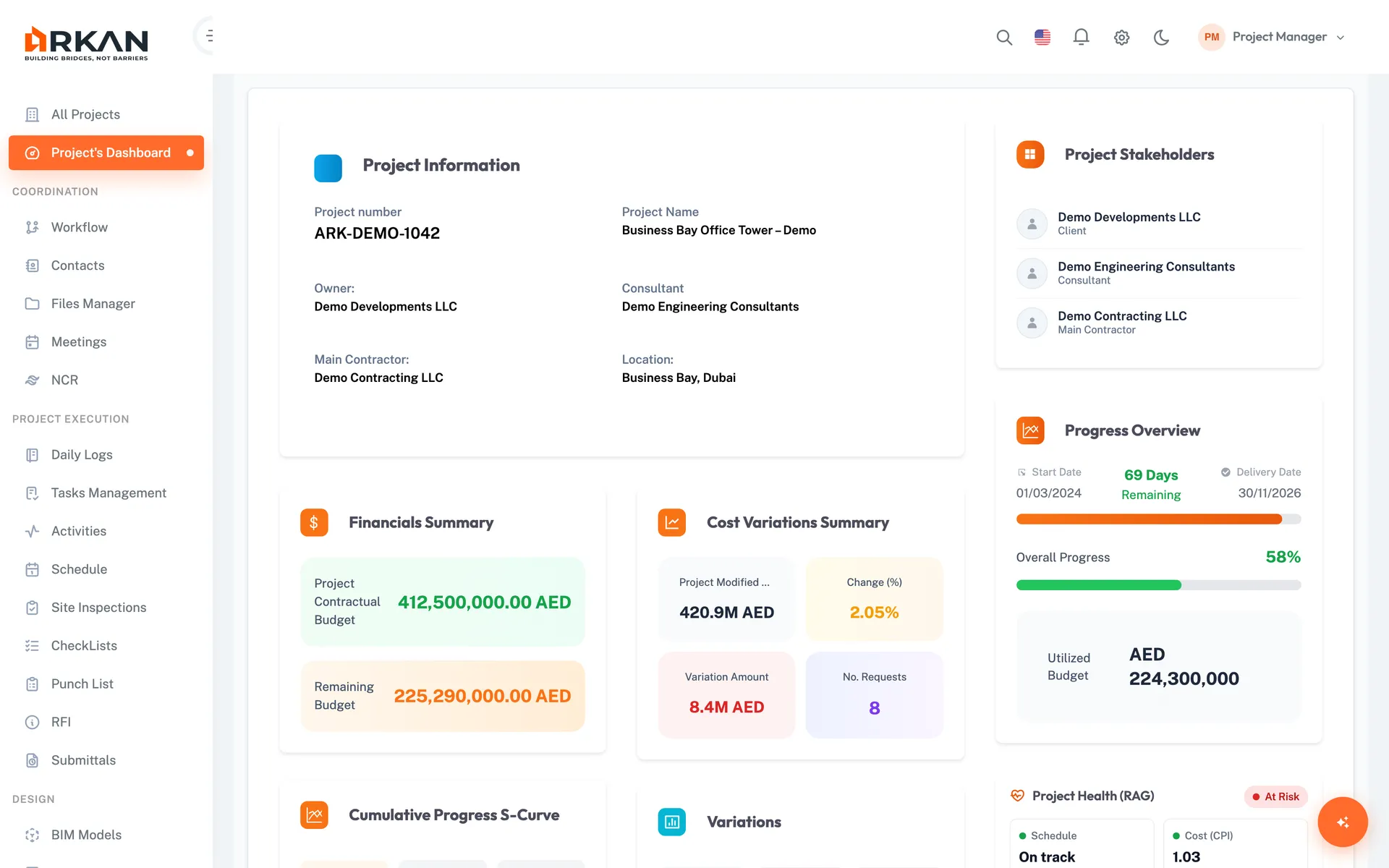
Project Dashboard
Each project's dashboard brings together the financial summary, cumulative progress curve, inspections, submittals, variations and pending workflow requests.
Leadership sees where a project stands without waiting for a compiled report.
The Workflows That Matter
From Inspection to Payment
Quantities re-typed from spreadsheets every month, then reworked when the consultant rejects the certificate.
Payment requests built from certified BOQ items, deductions calculated by the system, and approval routed through a workflow.
Variation Documentation
Verbal approvals, lost emails, disputed claims.
Every variation tracked from identification to approval, with a full approval history.
Who Uses Arkan
Role | How They Use Arkan |
|---|---|
| Project Manager | Project dashboard, workflow approvals, critical path tracking |
| Site Engineer | Inspection requests, checklist completion, daily logs |
| QS / Commercial | BOQ management, payment requests, variation tracking |
| Planning Engineer | P6 schedule import, Gantt view, version comparison |
| Document Controller | Submittal workflows, file manager, document versions |
| Finance Team | Payment tracking, advance payments, retention and VAT |
Imports & Exports
Oracle Primavera P6
Import of .xml and .xer schedule files, Gantt view, critical path analysis
Microsoft Excel
BOQ import with column mapping, grid exports to Excel
IFC Models (BIM)
3D viewing, clash detection between disciplines, RFIs created from the model
Getting Started
We help you set up, import your data and train your team.
What's Included
Guided Setup
Configuration, data import and training
Integrated Modules
Submittals, inspections, BOQ, finance, schedule, BIM and more
Bilingual
Full Arabic (RTL) and English interface
Got Questions? We've Got Answers.
It depends on the number of projects and how much data you bring. Implementation covers account setup, data import (P6 schedules, BOQs, existing documents), team training and go-live support. We'll agree a timeline with you during the demo.
Learn moreArkan imports P6 schedule files (.xml and .xer). Your planning team keeps working in P6 and uploads new versions, while everyone else sees the schedule in Arkan without needing P6 licences.
Learn morePayment requests are built from your BOQ in a guided 4-step wizard. Select certified items, link advance payments for recovery, and the system calculates retention and VAT before the request goes through its approval workflow.
Learn moreFor site coordination, yes. Subcontractors are set up as companies with their contacts, so you can assign punch-list items to them (and reassign when responsibility moves), and send RFIs to their contacts. Arkan does not have a separate subcontractor payment module: payment requests are prepared against the project BOQ for the contractor set in the project.
Learn moreWe help you import your existing P6 schedules, BOQs and documents during implementation so your projects start with the data you already have.
Not Ready to Start?
Try these resources first
Modules contractors use most
- BOQ managementImport the BOQ, track variations, claim from inspected items
- Payment requests (IPCs)Build the request with retention and advance recovery
- Schedule and Primavera P6Gantt, critical path and version comparison from P6 files
- RFIsQuestions with owners and due dates
- SnaggingSnags assigned to subcontractors with photos
- Document controlOne current version, full history