Public Projects Demand Public Accountability. Deliver Both.
Government construction projects face unique pressures: public scrutiny, regulatory requirements, audits, and stakeholder accountability. Arkan provides the transparency, documentation, and control that public sector projects demand.
Is Arkan Right for You?
If any of these apply to you, you're in the right place.
How It Works
Three simple steps to get started with Arkan
Requirements Analysis
We map your processes and approval hierarchies
Configuration
Set up workflows, per-screen permissions, and checklist templates
Controlled Rollout
Pilot, expansion and role-based training follow the separately agreed implementation scope
The Reality You're Living
Challenges construction teams in the region know well.

Fragmented Project Visibility
Infrastructure programs span multiple departments, contractors, and consultants. Status updates arrive in different formats, at different times, through different systems. By the time leadership gets a consolidated view, the data is already outdated.

Compliance Documentation Scattered
Every authority, contract and procurement rule has its own documentation requirements. Evidence lives in emails, shared drives, and filing cabinets. When auditors arrive, teams scramble to compile documentation that should have been organized from day one.
Contractor Performance Hard to Track
Government entities work with dozens of contractors across multiple projects. Performance data—quality scores, schedule adherence, safety records—exists in project-level silos. There's no centralized way to evaluate contractors for future tenders or flag underperformers before problems escalate.
What You Get
How Arkan helps your team day to day.
Faster Audit Preparation
Inspections, approvals, payments and variations are recorded as work happens, with version and workflow history, instead of being compiled at the end.
Documentation in the Workflow
Configurable workflows and checklists you set up for your own processes capture the evidence at each step.
Payments Tied to Verified Work
Inspection bills and payment requests are built from BOQ items, so public funds are certified against recorded work.
Controlled Variations
Variations are routed through configurable multi-level approval workflows before they are approved.
Handover Records Built Over Time
Documents, inspection reports and punch lists accumulate throughout the project. No last-minute scramble.
Built for How You Work
Every feature is designed with your specific needs in mind.
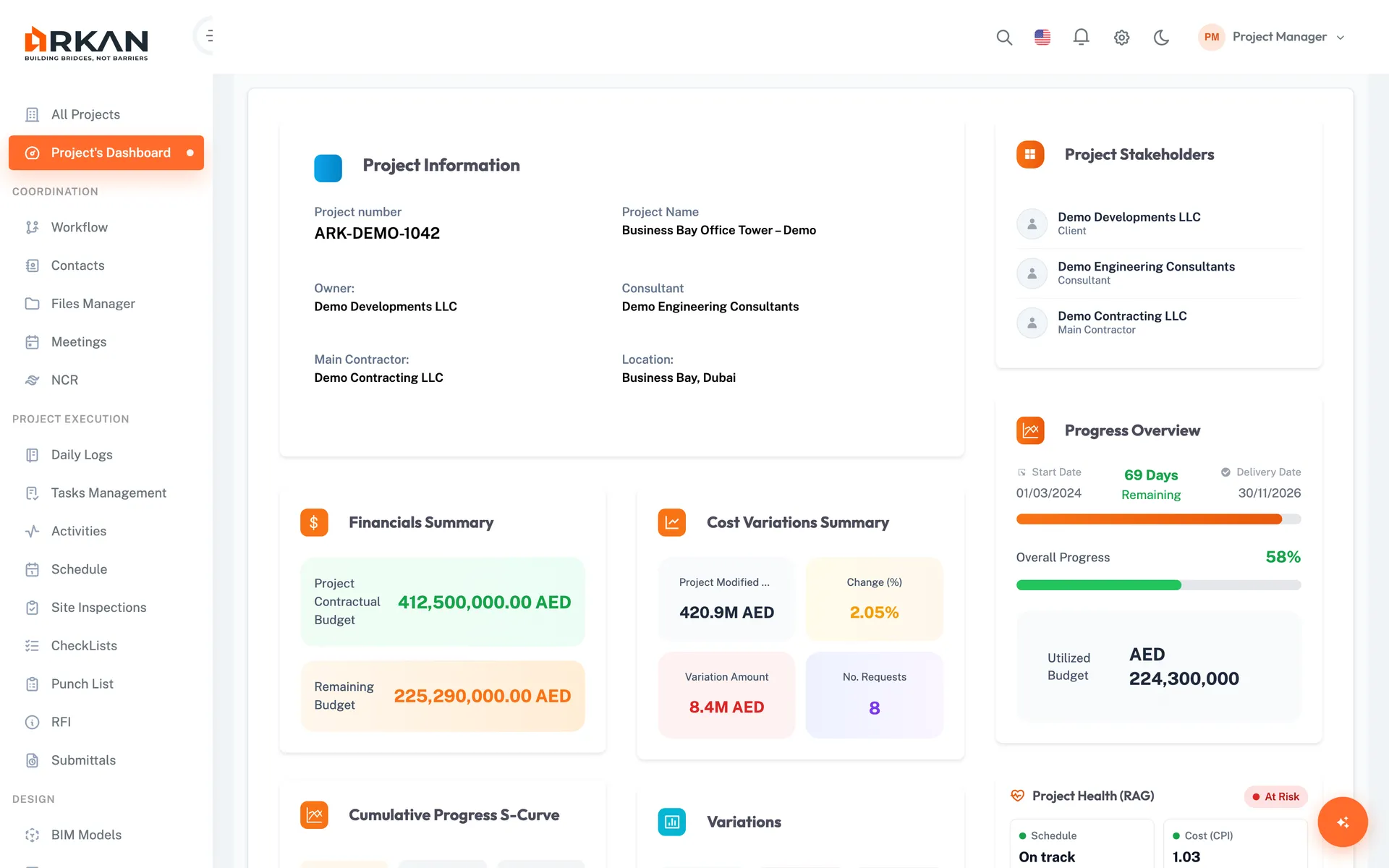
Project Dashboards
Each project has a dashboard with budget consumption, progress curve, inspections, submittals and pending workflow requests—available to leadership without waiting for compiled reports.
Leadership sees current project status, not last month's report.
- Financial summary and projections
- Planned vs. actual progress curve
- Pending workflow requests
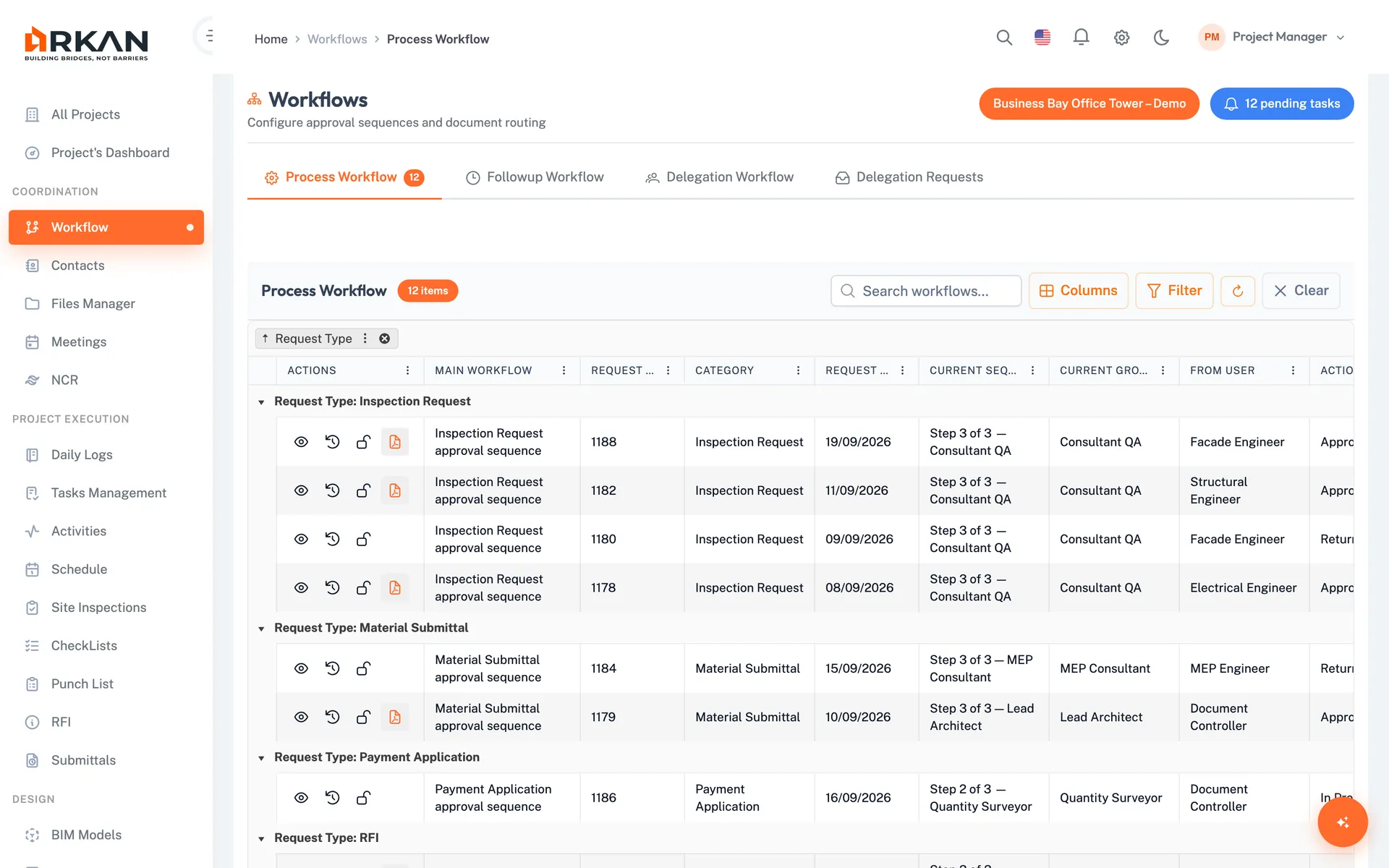
Configurable Checklists & Workflows
Build checklist templates and approval sequences for your own processes and requirements. Evidence is captured as work happens, not compiled after the fact.
Documentation is produced as part of the work.
- Checklist templates with five question types
- Configurable approval sequences and groups
- Version and workflow history
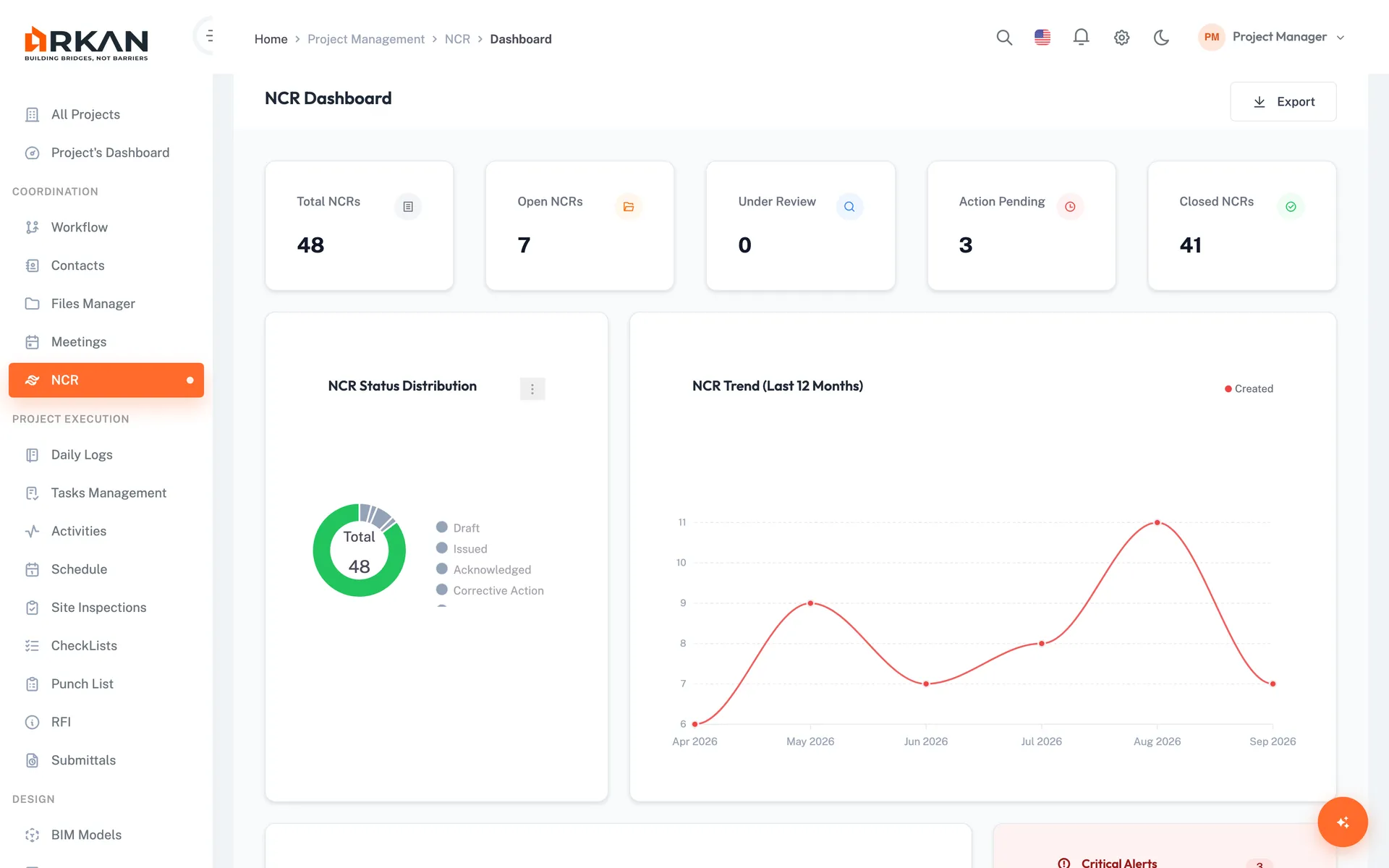
Quality & Non-Conformance Tracking
Inspections, NCRs and punch items are recorded per project with status, assignees and history.
Quality issues are tracked to closure with a clear record.
- Inspection dashboard and PDF reports
- NCRs linked to drawings with Smart Pins
- Punch list with photos
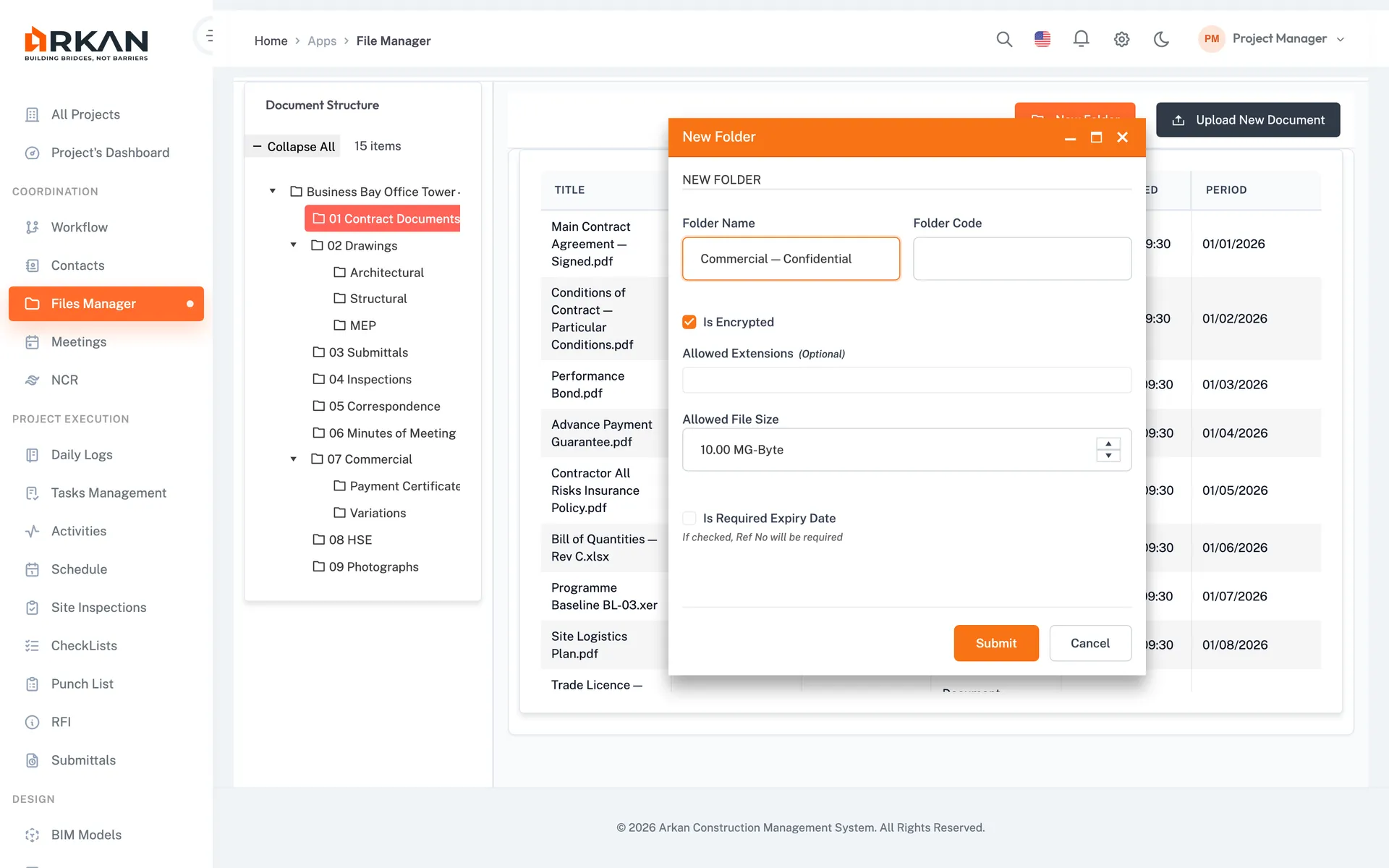
Exports & Reports
Export grids to Excel or PDF, and generate PDF reports for inspections, submittals, punch lists and meeting minutes.
Briefing material comes from project records, not manual summaries.
- Excel and PDF grid exports
- PDF inspection and submittal reports
- Official meeting minutes in PDF
The Workflows That Matter
Public Funds Certification
Manual verification, paper trails, delayed approvals.
Every payment tied to verified work, approved through documented workflow.
Variation Approval
Verbal approvals, incomplete documentation, disputed claims.
No variation proceeds without proper documentation and multi-level approval.
Who Uses Arkan
Role | How They Use Arkan |
|---|---|
| Project Owner (Government) | Project oversight, milestone tracking, budget monitoring |
| Project Management Consultant | Day-to-day oversight, approval workflows, reporting |
| Contractor | Progress reporting, payment requests, document submission |
| Design Consultant | Submittal review, RFIs, BIM clash detection |
| Quality Assurance | Inspection management, checklist verification, NCR tracking |
| Finance / Audit | Payment verification, workflow history, financial exports |
Imports & Exports
Oracle Primavera P6
Import of .xml and .xer schedule files, Gantt view, critical path analysis
Microsoft Excel
BOQ .xlsx import with fixed columns and validation; grid exports to Excel
IFC Models (BIM)
3D viewing, clash detection between disciplines, RFIs created from the model
Getting Started
Implementation is scoped and priced separately from the annual software licence. Configuration, data migration, training and launch support are agreed in a statement of work, with deliverables, acceptance criteria and a project-specific schedule. Implementation steps describe activities, not days; Arkan does not promise a standard five-day go-live.
Plan Your Project Scope
Guided Setup
Configuration, data migration and training are scoped and quoted separately in a statement of work
Selected Workflow Packs
Platform Foundation plus the workflow packs licensed in your project quote; AI assistance is quoted separately
Bilingual
Full Arabic (RTL) and English interface
Got Questions? We've Got Answers.
No. Arkan does not offer a standard five-day implementation guarantee. The schedule depends on the projects, data, configuration, training and integrations in scope. Implementation is quoted separately from the annual software licence, and the scope, schedule, deliverables and acceptance criteria are agreed before work starts. Numbered implementation steps are activities, not a day-by-day commitment.
Learn more: Does Arkan guarantee implementation in five days?Arkan is licensed annually for each named project, with no per-user fees. Each project includes Platform Foundation plus the workflow packs you select. Implementation, data migration and training are scoped and priced separately in a statement of work.
Learn more: How is Arkan licensed?Arkan keeps a version history for documents and a workflow history for every approval, showing who did what and when. Grid data and reports can be exported for auditors.
Learn more: How does Arkan support audit requirements?Arkan does not ship pre-built regulatory templates. You set up configurable workflows and checklists for your own processes, so your team captures the evidence your authorities and contracts require.
Each variation is documented against BOQ items with its value impact and approved through a configurable multi-level workflow (for example technical review → financial approval → final authority).
Learn more: How does the variation control workflow work?Yes. Per-screen permissions let you give each stakeholder—project owner, PMC, contractors, consultants and oversight teams—access to the right data, with workflow history for every approval.
Not Ready to Start?
Try these resources first
Modules government teams use most
- Approval workflowsConfigurable approval sequences with history
- Document controlVersion history and visibility levels
- InspectionsInspection requests with digital signature
- Non-conformance reportsRecord and close quality issues
- MeetingsDecisions and actions with minutes
- Project dashboardsProgress across stakeholders
