The Data Gap
- 1Weekly status reports are obsolete before they're read
- 2Financial data lives in separate systems from progress data
- 3KPIs require manual calculation from multiple sources
- 4No warning system for projects going off-track
- 5Different people quote different numbers depending on which spreadsheet they opened
Arkan Project Dashboard & Analytics Capabilities
Financial KPIs
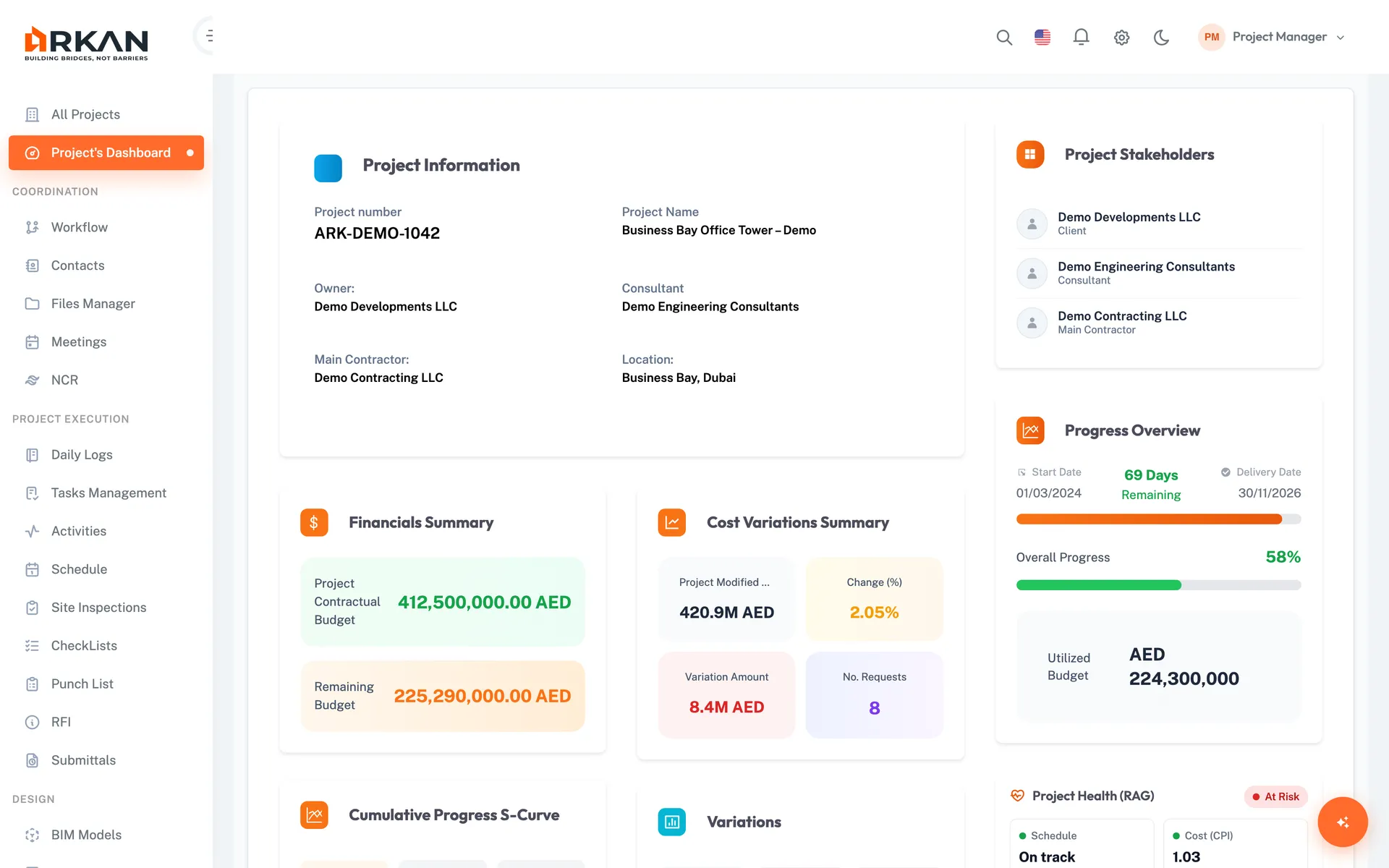
Contractual and remaining budget, modified budget after variations, total till date and difference from last payment
Shown in the project currency
Progress Tracking
Timeline progress with days remaining or an overdue warning, schedule-based overall progress from Primavera, and utilized budget
Cumulative S-curve from monthly payment snapshots
Inspection Metrics
Approved, In Process and Returned counts, a monthly inspection projection chart and a table of in-process inspections
Monthly projection chart
Submittal Overview
Completed, Pending and Delayed counts, charts by discipline and status, and submittals due in the next 14 days
Upcoming submittals table
Activity Monitoring
Last inspected phase, upcoming critical path activities, a completion donut chart, and grids of activities about to start or finish
Sortable activity grids
Variations & Workflow Requests
Additions, deductions and net variation with a bar chart, locked and on-hold BOQ items, and workflow requests by category and status
Stacked workflow status chart
Technical Comparison
See how Arkan outperforms traditional solutions
Dashboard KPIs
Contractual & Remaining Budget
Financial summary in project currency
Cost Variations Summary
Modified budget, change %, variation amount, requests
Cumulative Progress S-Curve
Last 12 months from monthly payment snapshots
Timeline Progress
Days remaining or overdue
Inspection Overview
Approved, In Process, Returned
Submittals Overview
Completed, Pending, Delayed
Simple 4-Step Process
Connect: Data flows automatically from all platform modules
Select: Choose the project from the project selector
Read: Each widget section loads independently
Act: Open the related module from the sidebar to take action
At a Glance
Dashboard Widgets
17
Financial, schedule, inspection, submittal, variation and workflow widgets
Progress S-Curve
12 months
Built from monthly payment snapshots
Upcoming Submittals
14 days
Submittals due soon, with days remaining
Works seamlessly with other Arkan features
Project Dashboard & Analytics integrates with Project Hub, Financial Management, Inspections and more for a complete construction management solution.
Related Features
Explore other features that work great with Project Dashboard & Analytics